
LinkLib
  • Welcome, Username
    • Search
    • LinkLib a Video
    • My Videos
    • All Videos
    • Logout

Videos will never be the same.

Do you look for info on your phone while you watch videos? LinkLib lets you change that.

youtubevimeo
LinkLib

About Us


LinkLib changes the way we watch.


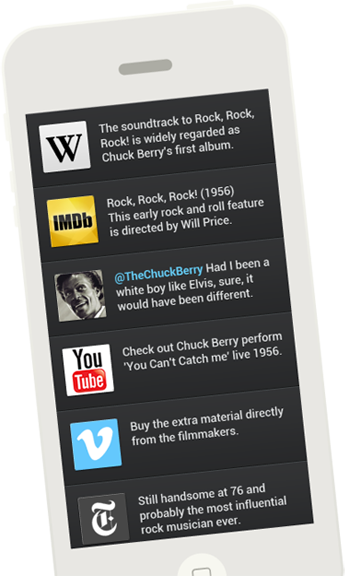
LinkLib is an easy-to-use tool that connects your phone to info-filled videos. Simply sync a phone or tablet to videos, and LinkLib delivers a feed of links and comments directly to your device. Now you don’t have to search for facts or info about what you’re viewing, LinkLib has you covered.

Links are integrated into videos through the LinkLib timeline, connecting you with time-synced links and comments on your phone when it appears on your screen.

LinkLib creates a “second screen” experience so you can enjoy your videos and connect with all kinds of info, without distracting you from what you’re viewing.

See a link that looks interesting? Go ahead, click it. Don’t want to hit pause? Just follow up after the film. With LinkLib it’s up to you to decide which links you want to read when it’s convenient for you.

Everyone can participate and LinkLib a video. We currently support YouTube and Vimeo, letting you LinkLib all kinds of videos: full length films, documentaries, trailers, music videos, tv shows, debates, tutorials or even viral videos.

Join LinkLib and see where your videos take you.


Who we are.


LinkLib was created by a small team led by filmmaker Simon Klose who faced a problem in filmmaking. While creating his documentary TPB AFK: The Pirate Bay Away From Keyboard, Simon couldn't squeeze in all the stories about the broad and complex copyright debate into his 85 minute film. He wanted a way to integrate links into the film without taking away from the viewing experience. This is when your phone came in. The “second screen” feed was developed, LinkLib was born, and the rest is, well...just getting started.

LinkLib is a small team just starting up! Tell us how we can make it better. Send us your feedback at simon@linklib.org or on Twitter @linklib_.

FAQs


Why use LinkLib?

How does it work?

How do I connect?

Who makes LinkLib videos?

How do I add videos?

How do I LinkLib a video?

How do I edit videos?

What links should I use?

Why don't the links show up?


Why use LinkLib?


LinkLib gets you more out of what you watch. Now you can easily participate and engage in videos and share them with your friends.

LinkLib can also be used as a tool for filmmakers to explore new ways to connect with their audiences.


How does it work?


Links are integrated into videos through the LinkLib timeline, a simple, easy-to-use tool. As you watch the video, links appear on your smartphone or tablet based on its location in the LinkLib timeline.


How do I connect?


After you select a video click the “Connect” button. Using your smartphone or tablet, scan the code with any free QR reader. Ta da! You’re synced. Now you can full screen the film and read the links on your phone. If you play the video in your browser you’ll see the links to the right of the film.

We recommend i-nigma for iPhone and QR Droid for Android for some of the best readers out there.


Who makes LinkLib videos?


Everyone! People like you are curating LibLink videos everyday.

Are you a filmmaker? Create your own director’s commentary, connecting audiences to additional footage and interesting facts behind the film.

Film critic? Add comments to movie trailers and link the video to the full page reviews.

Enjoy blogging and creating tutorials? Easily link your viewers to the tools and products mentioned in your videos.

Are you an avid video-viewer? LinkLib enhances videos.


How do I add videos?


Sign up and search for videos or start adding clips of your own. We currently support both YouTube and Vimeo.


How do I LinkLib a video?


It’s simple. Just sign up and hit “LinkLib a video”. Select any video from YouTube or Vimeo, and enter links in the timeline when you want them to appear.


How do I edit videos?


Your LinkLib will auto-save each link you enter in the timeline, you can add more at any time. If you want to edit or delete a link just hit the settings icon to the right of each link. You can change the link title, URL, the timeslot, or even choose a custom icon.


What links should I use?


That’s the best part. The links are entirely up to you. You can create your own video commentary, packed with interesting trivia, important articles, or fun facts.


Why don't the links show up?


Don’t forget to sync. The QR codes are as unique as every LinkLib video. Make sure you scan the code each time you watch a video.

View on Linklib

LinkLib timeline

Your session is automatically saved

Step 1

Step 1

Choose a video

Step 2

Step 2

Scan the QR code to connect device

Step 3

Step 3

Watch and learn

Featured Videos

Interesting and informative videos we know you’ll love.

video

Moonrise Kingdom

video

Indie Game The Movie

video

Seapunk Drama

video

Presidential Debate 2012

video

Mad Men HD


video

The first full length film

TPB AFK: The Pirate Bay Away From Keyboard directed by Simon Klose. Watch the director’s version of the feature documentary packed with links to background information, the people in the film, articles on the copyright debate and deleted scenes.


LinkLib

Sign In

Filter

Edit Feed

twitter
Title
body

Register

Share Video

Video Settings

LinkLib a Video

Share User

Beta Invitation

Send us an email if you want a beta invite.

Invite me

Password Reminder

Enter your email address and we'll send you a link that'll allow you to change your password.

Reset Password

Sync feed to Mobile

Show Video

Create Account

Read Our Blog

Follow on Twitter

Like on Facebook

About LinkLib

LinkLib
  • ABOUT US

  • FAQ'S

  • CONTACT